Thursday, August 7, 2014

Week-end tallies: Fourteenth week in review

So it's only Thursday, and here I am writing the weekly tally. Why? Well, it's our anniversary weekend, and Joe and I have lots of plans for fun things to do as a family. So, I'm treating myself to a weekend off!

This week has been great for seeing forward momentum again. I set a goal for myself to get 10 new pieces listed in the month of August, and I managed to get them all posted this past week. A couple sales saw some pieces going off to new homes, and I still have 20 pieces photographed and ready to trickle in over the next three weeks. Great stuff!

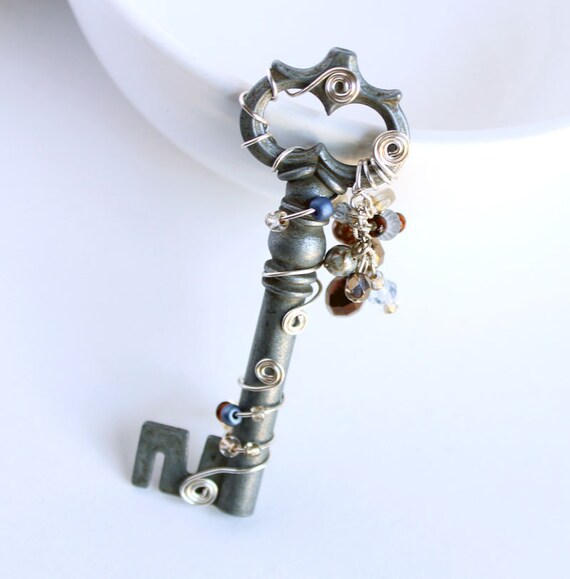
Here's a peek at one of my favorite additions this week:

Embellished silver key necklace, $10

Since I haven't listed the other 20 items yet, I decided not to include them in the value of pieces on the table. I'll add their value to the tally as I list them, which is exciting, because it means that number will slowly start creeping up. I'm excited to see it break the $1000 mark, because that means there'll officially be enough jewelry around to meet the overall goal.

'Til next week!

Total value of items made: $826.00
Total expenses to run business: $63.18
Total income: $126.00

Tuesday, August 5, 2014

Why edit photos?

Cleaning photos can be a lot of work, especially when photographing a lot of pieces at once. I spent some time taking photos of 30 items over the weekend, which meant I ended up with 245 photos to filter through, crop and clean up. That's a lot of work.
Sometimes I look at the huge numbers of photos, sigh, and feel discouraged. It's a lot of work for seemingly little payoff, so why edit your photos?

Cameras have come a long way, but they still don't capture most things exactly as you see them. Colors aren't always quite right, the purple spectrum is especially hard to capture accurately. This is why post-processing has always existed. Adjustments made after the photograph is taken can make a world of difference! Don't believe me? Here's a photo straight off my camera, it's only been cropped to eliminate useless white space.


These earrings are made with beautiful, shiny red glass beads and antiqued brass wire. They were photographed against a piece of white poster board, in natural morning daylight. As you can see, the red isn't too red, the brass isn't too brassy, and the white background is definitely not white. In fact, it doesn't look anything like what I was actually looking at!


Less than a minute later, I've made a few simple changes to the photo. Using Photoshop CS5, I made the following fast tweaks:
• Auto contrast
• Auto color
• Adjust levels (increasing whiteness)
• Auto tone

That's it! Less than sixty seconds. Eight clicks of the mouse. And now it's not just closer to what the image looked like to the human eye, it's better a better product photo. When you compare the two, which looks better?
The first one isn't bad, but the second is a much higher quality photograph. That's why even basic post-processing is important for your shop.

But that's it for today - I still have 244 photos to clean up!

Friday, August 1, 2014

Week-end tallies:Thirteenth week in review

What, thirteen?! Where did eleven and twelve go?
Shame on me, the weeks were so busy I didn't have a chance to write about them at all. But that's okay, because I didn't make much progress, either! That's the thing about busy weeks, they're either busy with the shop or too busy for the shop.
But week 13 saw some advancement!

After sending off a sale, there's a delightful thing to report: The next milestone!
Yes, the shop has finally reached one hundred dollars in income. That's one tenth of the total goal for this project! Of course, it's both a good and a bad thing - As great as it is to reach this landmark, it also puts some things into perspective. For example, since it took 13 weeks to hit the $100 mark, that means at this rate, it'll be another two and a half years before we reach the $1,000 mark.

Ouch.

But hey, one step at a time, right? It's still forward momentum and a great bit of progress, so there's no shame in that. Plus, I think starting a new month with a landmark at our feet and a bunch of new ideas and prospects is a great way to go, so... Onward!

Total value of items made: $716.00
Total expenses to run business: $60.16
Total income: $103.00

Wednesday, July 16, 2014

Making an activity schedule

When you run a business of your own, it's important to keep regular activity going. This helps entice people to come back regularly to see what's new. Even better if you consistently update on the same days each week! I update my regular blog every Tuesday, which means I always see traffic spikes on Tuesday afternoon. People who read my blog are used to seeing my updates then, so they expect to see a new post every week.

You don't have to solidly schedule updates, though, as long as there's activity during the week. This can be anything from new items, updates to existing items, new blog posts, or general updates to your business.

Photo courtesy of ©iStockphoto.com/SparkleArt
For me, I like to create a list of things to do for my shop, and add it to my regular to-do list. But I'm also a huge fan of lists, so I realize it may not work for everyone!

But what if I can't keep up with my activity schedule?
That's a question I ask myself a lot. But by breaking it down into bite-sized pieces you can tackle in a spare 5 minutes here and there, you can get a lot accomplished!

Everyone's needs are different, but here's a rough idea of what my shop's weekly activity schedule is like.

• List one item in the shop each day, if items are ready
• Photograph items once every 2 weeks
• Clean and crop photos once every 2 weeks
• Change unsuccessful listing keywords on one item per week
• Post something to social media sites once a day
• Shipping sold items and answering questions as needed

And that's it!
With the exception of the photography and photo cleaning, which takes about half an hour to an hour each on the days I sit down to do them, everything on my list can be done in 5-10 minutes.

Productivity doesn't have to be scary, but it does take determination. Do yourself a favor early on and figure out what work needs to be done each week.  The earlier you start with it, the sooner it will feel like second nature.

Tuesday, July 15, 2014

Week-end tallies: Tenth week in review

I've been bad, I admit. It's hard to work when the sunshine keeps luring me away.
I did make a little headway, just not with photographing or adding anything to the project shop. Instead, I took some time to sort through old pieces and figure out which ones are worth keeping, and which should be disassembled and turned into new things.

I ended up with a whole bag of things to remake later and I'm excited to get started, but that's all I have to report for week 10.

Total value of items made: $716.00
Total expenses to run business: $60.16
Total income: $78.00

Tuesday, July 8, 2014

Week-end tallies: Ninth week in review

FIFTY!
That's how many items are now listed in the project shop. That's halfway to my goal of 100 items, and I'm super excited to have made it!

June was a crazy busy month here, which means my stock of photos and products has run dry, but I'm going to be working to rectify that this week. I always work best by making a day where I photograph 20-30 pieces, then I try to sprinkle new listings through the week. I do have a plan for shop activity, which I'll be sharing here soon - This week, if I'm able.

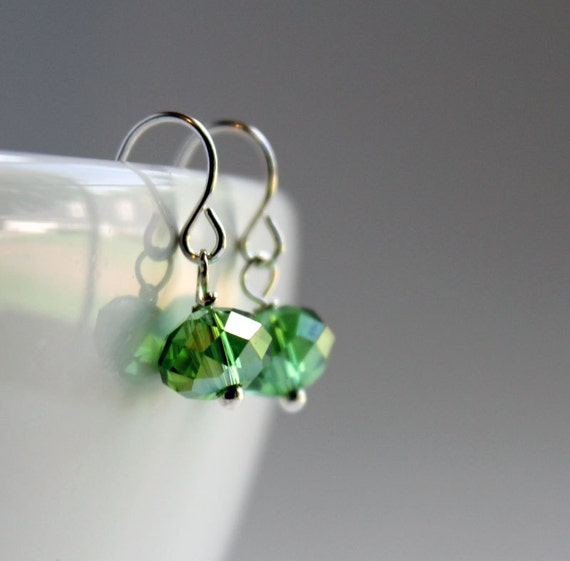
In the meantime, here's the lucky earrings that got to be item #50:

Green crystal drop earrings, $9
How great that they're even green, the color of luck.
That's it for this update, though - Aside from a few new listings, there's nothing going on here, though I am working on fleshing out details for a few custom orders. Here's hoping everything pans out, because hitting that $100 milestone is so close!

Total value of items made: $716.00
Total expenses to run business: $60.16
Total income: $78.00

Thursday, July 3, 2014

Outposting your business, and why you shouldn't do it

When you think of an outpost, you probably picture some sort of lonely fortress on a distant hilltop.You'd be right, of course, at least in the normal, everyday world. But what is an internet outpost, and what does it have to do with a crafting business? Keep reading!


Any time you set up a place online where your work can be found, it's an outpost. This blog, my Etsy shop, my Facebook page, Twitter - All of these are outposts.
But wait, you're thinking. Why are you saying outposting is bad when you have so many outposts of your own?
Outposting in and of itself isn't a bad thing, but the idea is simple: Never put all your eggs in one basket, and definitely never put them all in a basket that doesn't belong to you.

It's important to have your own website, and it's now easier than ever to make one. I keep a site of my own for my writing (which you can see here) and it's great, because it's ad-free webspace that's completely under my control. I back up my own content and the only way it's going anywhere is if I decide not to pay the hosting bill. No one closes my site except for me. I'll never have to worry about my portfolio vanishing out from underneath me, it won't go anywhere unless I decide it will!

But why all the outposts, if I have my own site?
Because accidents happen, too. Web hosts suffer outages due to hardware or power failure. Sites get hacked and forced offline until repairs are made. Accounts get suspended because you forgot to change the autobill information after you got your new debit card. Not that I've ever done that one, or anything.

While none of these will put your site out of commission permanently, it's important to keep alternate avenues of communication at your fingertips so that your clients know you're still around. It only takes one attempt to refresh a missing page for visitors to get scared and think their order is lost in the ether, trust me! But if you've also set up communication outposts on social media sites, it only takes a moment to share a message saying that you're aware of the outage and everything is okay, and will be back to working order soon.

Even if you set up shop on your own webspace, always keep a separate communications outpost. This can be social media platforms like Twitter or Facebook, or even a mailing list with the email addresses of your customers. Never back yourself into a corner by having your work found only where other people control it.

For a quicker explanation to finish things out, here's a short story: My husband does a lot of art and posts a great deal of it online. Aside from his personal blogs, he also posted it places like deviantART and CGHub. Then one day, CGHub - and everything on it - just vanished. No warning, no explanation, just there one minute and gone the next. Nobody had a chance to back up their work, and several prolific artists found themselves in trouble, because their CGHub gallery served as their online portfolio, showing off their work and drawing new business in. Without warning, they had no way to contact fans or clients, nothing. They lost their entire following in an instant because one site vanished.
All because they outposted their work.